
Here is how I landed my first legal marketing case study without spending a dollar on ads, using outbound cold email lead generation. I had barely any warm introductions, zero industry connections, and no friends who were practising lawyers.
I did have a track record as a digital marketer, so I set out to learn cold outreach from scratch and leverage AI tools.
I was breaking into a new industry, building proof and trust from zero. My first two cold email campaigns opened with a lacklustre 7% open rate. This was when I had sloppily cold-emailed roughly one-tenth of Singapore’s legal industry. Today, we consistently achieve 25 to 30% open rates.
Here is exactly how I did it, and how you can replicate this method to break into any B2B industry in Singapore.
How To Scrape the Web for a Cold Email List
You can find formal or informal directories for nearly any industry online. If you work in B2B lead generation, simply apply the same principles.
I built a list of around 600 email prospects by scraping a law firm directory. This took roughly a month because I knew nothing about Python or automation scripts when I started. The process was manual: the data contained duplicates, inaccuracies, and many listings were outdated or non local.
The challenge wasn’t scraping itself. It was that I wasn’t yet proficient with scraping scripts, nor did I have a web developer’s perspective on how websites function.
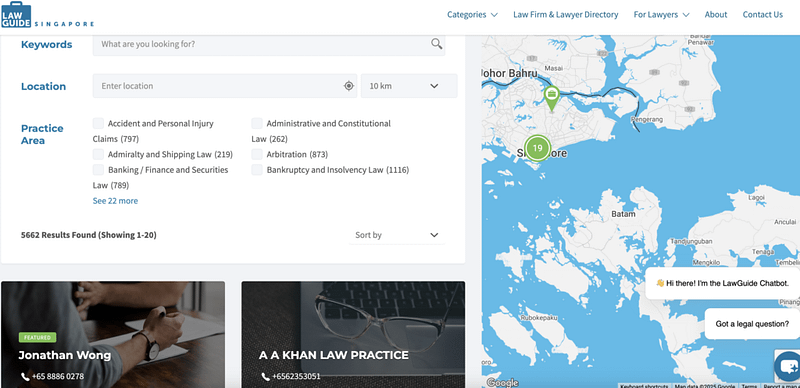
It was also my first time executing cold outreach for B2B lead generation. I believe I succeeded on the first attempt because of my years of marketing experience.
The result? I connected with a business development manager, an ex-lawyer at a mid-sized firm, who referred me to Kelvin Ong from Contigo Law. He came on board, and that is how I secured my first digital marketing case study in the legal industry.
Tools for Cold Email Outreach
Prior to this, I had done cold outreach to acquire SEO backlinks, so I applied similar principles. I used Hunter.io to get the emails, and I used Mailshake to schedule automated emails.
I later found out that today’s cold email outreach landscape has changed. Since everyone is getting spammed in their inboxes, deliverability has dropped to an all-time low, and spam filters are more sensitive than ever.
Through the help of generative A.I. tools, combined with agentic concepts, you’ll be able to personalize your outreach! The better part? You don’t even need expensive software to get started.
| Tool | Purpose | Cost |
|---|---|---|
| Mailshake | Cold email platform, sequences, deliverability | Paid |
| Hunter.io | Email finding and verification | Free/Paid Tier |
| Groq API | LLMs for research, decision making and generating icebreakers | Free/Paid Tier |
| Gemini API | LLMs for research, decision making and generating icebreakers | Free/Paid Tier |
| Python + IDLE | Scripts for scraping and automation | Free |
| Apify | API for Google results and web scraping | Free/Paid Tier |
| Claude | Creating Python scripts and generating icebreakers | Free/Paid Tier |
With the help of generative AI tools, combined with agentic concepts, you’ll be able to personalise your outreach! The better part? You don’t even need expensive software to get started.
Tools for Cold Email List Web Scraping
Suppose you want to reach the Directors of smaller law firms that has lesser than five lawyers working in the firm. I target this segment because smaller firms are often more amenable to lean marketing strategies such as Meta ads.
Here is the challenge: for each prospect, you need to identify the right contacts from their website, research their profiles and practice areas, craft a customised opening paragraph, send the email and follow up multiple times.
If you were to do this manually, you could burn out before researching 30 contacts. You could also hire a virtual assistant, but that costs time and money and quality isn’t guaranteed.
Today, with nearly every small business owner receiving cold outreach, generic templated emails simply don’t work. The sweet spot? Use AI to handle research, light decision-making and personalisation, while you maintain human oversight for quality control.
The Manual Method: Web Scraping With a Chrome Plugin
I started by using a free Chrome extension from webscraper.io to extract data from a law firm directory. It works, but it is manual, can be time intensive to set up, and buggy.
Vibe-Coded, AI-Powered Scraping With Python Scripts
Today, you don’t have to do this by hand. AI capabilities today are remarkable. There is even a term for this workflow: vibe coding.
You can use Grok, ChatGPT, or Claude with a prompt like, “I want to scrape this directory using Python or IDLE. I am a complete beginner. Teach me step by step.”
You will be impressed by how detailed and intuitive the guidance is. I use Claude’s paid tier (Opus 4.5 is the most intuitive model I have experienced), but when my tokens run out, I use Grok or ChatGPT’s free tier to review and edit code.
I execute all scripts via Python’s IDLE editor or the system terminal. It’s both free and straightforward.
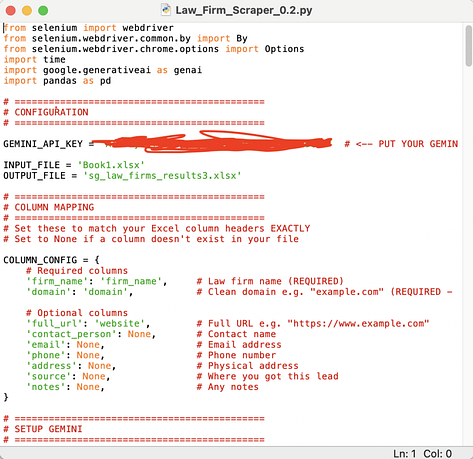
Staring at code can feel daunting at first. However once you get the hang of it, the process becomes engaging. You don’t need deep coding expertise: when issues arise, iterate with free LLMs. You will reach the desired outcome 99% of the time.
IDLE is one of the most basic code editors. You may be surprised that you don’t need complex frontend platforms like N8N or Make.com to achieve strong results, though if you prefer a visual interface, learning N8N is a valid path.
I actually started with Make.com before transitioning to code.
How to Think About Agentic AI in Cold Email Campaigns
I find it more effective to process data in batches rather than building a single end-to-end workflow that may break or require refinement mid-stream. For example, with 200 rows of data, process 20 first to validate the approach before scaling.
I use separate scripts for distinct functions: pulling emails from HubSpot, updating CRM data, analysing firm information, and personalising outreach based on scraped web data. It typically takes three to four seperate scripts, run in batches of 20, to reach the final output.
This approach works better for me than constructing a monolithic workflow in N8N or Make.com.
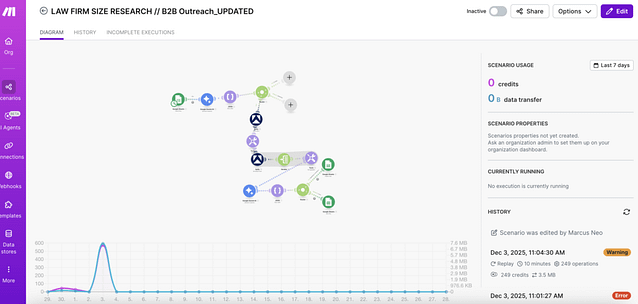
When using AI, aiming for 100% automation or full AI reliance is going to produce hallucinated outputs. You’ll want to check for quality in every batch. My recommendation is to aim for 60% AI automation and at least 40% manual oversight and editing.
This balance delivers scale without sacrificing quality or deliverability.
Cold Email Frameworks for B2B Outreach
Generic cold email templates are overrated. They often lead to poor deliverability, low open rates, and minimal results. Most cold emails today get ignored. After all, sending cold emails are low cost and low effort.
Inboxes are saturated. If you use a template without any personalisation, you are better off cold calling or building a paid media acquisition funnel.
However, templates become powerful when combined with customisation and placeholder driven personalisation.
Here are my core frameworks for the initial outreach email:
Placeholder 1: Include a Specific, Personalised Icebreaker
Star with a genuine, tailored compliment. This demonstrates you have done your homework and respects the recipient’s time.
Framework 1: Clear Value Proposition
State concisely what you do and for whom. In my emails, I specify that I help law firms acquire more clients through Meta advertising. My agency operates on a “perform or you don’t pay” model.
Framework 2: Social Proof
Mention relevant credibility: for example, that I have worked with a recognised lawyer and can share a real world case study.
Framework 3: A Low-Pressure Call-to-Action
Include a gentle CTA inviting a reply or a referral to someone who might benefit. I avoid asking directly for a sale or meeting in the first touchpoint.
How to Set Up a Cold Email Campaign With AI (Step by Step)
Key Concept: You Don’t Need to Know How to Code. You Need to Know How to Prompt
I don’t know how to code. I use IDLE as my Python editor, nothing fancy. The scripts? I built them by conversing with Claude.
Tell the LLM exactly what you need in plain English. Be logical and descriptive:
“I have an Excel file (abc.xlsx) with Singaporean law firm names and website URLs. Write a Python script that does the following:
- Read the Excel file and loop through each firm’s URL.
- Scrape each website’s navigation menu to extract internal page URLs.
- Pass the list of navigation links to an LLM to identify which URL most likely contains team or lawyer profiles.
- Scrape that page and extract individual lawyer profiles, including names, titles, and bios.
- Pass the extracted profiles to the LLM to categorise each lawyer by seniority: Partner, Director, Senior Associate, Associate, or Paralegal.
- Count the total number of lawyers per firm.
- Output everything to a new Excel file with columns for firm name, website URL, total lawyer count, lawyer names, and seniority levels.
Use the Groq API for all LLM calls. Handle scraping errors gracefully: if a site fails or lacks an identifiable team page, log the error and continue to the next firm.”
You may not get working code on the first attempt. However through iterative feedback, you will arrive at a functional solution.
There is no one-size-fits-all prompt. You must communicate with the LLM iteratively. You can ask it to fix errors, explain what isn’t working, and refine. The more you iterate within the same chat session, the more aligned the output becomes.
Step 1: Batch Your Data
Process data in small batches, 20 rows at a time.
When something breaks (and it will), you avoid corrupting your entire dataset or halting your workflow. Separate functions into distinct scripts: scraping, research, personalisation, and output. This prevents bloated, hard-to-debug code.
Start simple: an Excel sheet with company name, website URL and basic details.
Step 2: Leverage LLMs and Python Scripts for Heavy Lifting
This is where AI accelerates your workflow. Example flow:
- Scrape the company website in your Excel sheet
- Pass URL data to an LLM
- Identify which pages to crawl deeper (for example, Team or About Us)
- Extract individual lawyer profiles
- Categorise contacts by seniority: Partners, Directors, Senior Associates, Associates, Paralegals
- Output practice areas and specialisations
- Output total lawyer count and categorise firm size: small (1 to 5), medium (6 to 30), large (31 and above)
This enriched data helps me filter targets. For instance, I avoid reaching out to IP or shipping lawyers, as they fall outside my ideal client profile. I also focus exclusively on smaller law firms.
Step 3: Generate Personalised Icebreakers With AI
Today, you got to assume everyone is doing cold outreach. Today, as a business owner, you’re likely receive constant pitches, so spam filters are highly sensitive and quick to divert emails to junk folders.
Personalisation helps bypass filters and signals genuine effort to the recipient.
In most outreach softwares like Mailshake, you can personalise at scale using Spintax, placeholder fields in outreach tools and AI-generated icebreakers.
I configure agents to scrape website data, then pass it to an LLM to classify firms as full service or specialised (for example, shipping, M&A, or IP). I can also scrape lawyer profiles, their educational background, and work experience, and cache them.
Now after filtering contacts, I use a Python script calling an LLM API to write a two line, personalised icebreaker for each prospect based on their profile or firm focus. I then manually review and refine the AI generated icebreakers.
This process also deepens my understanding of each business and/ or prospect.
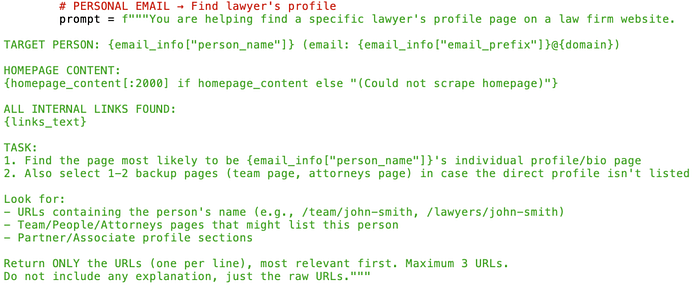
The output should be specific, not generic praise like “I saw your company is doing great things.”
Here is a real, usable output:
“X Law Firm’s Senior Lawyers each bring 30+ years of legal experience to the table. That kind of depth across the team is hard to find in smaller practices.”
Groq’s Qwen model performs well for this task, but feel free to use your preferred generative AI model.
Step 4: Handle Exceptions Manually
Not all AI workflows will run autonomously without disruptions. Not every website can be scraped. Anti scraping measures exist. Not every prospect’s profile is publicly listed. Some law firm sites lack lawyer bios or an About page. These cases require manual input.
For example, if a site resists scraping, I manually copy the lawyer page into Claude and prompt:
“Write a two-line email icebreaker for these lawyer profiles based on my previous inputs.”
Then I update my Excel sheet manually. This is still far more efficient than handling 80% of contacts by hand. Yes, AI accelerates the process, but it isn’t perfect. Expect to manually handle 10% to 30% of records.
Step 5: Upload and Launch Your Cold Email Campaign
With icebreakers finalised, I upload everything to Mailshake: first name, last name, email, and a custom icebreaker field.
The icebreaker placeholder injects the personalised line into each email. Combine this with Spintax variations where appropriate to ensure each message feels unique, improving deliverability.
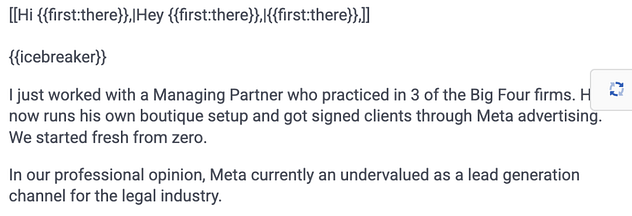
I always preview emails to confirm icebreakers align with the correct contacts.
Best Cold Email Subject Lines
Your subject line determines whether your email gets opened. Everything else is irrelevant if they don’t click.
Make it specific: use the recipient’s firm name, practice area, or actual name. Aim to spark curiosity. Avoid clickbait. Steer clear of spam-trigger words like “free,” “guarantee,” or “urgent.”
Subject Line Examples That Work
“Quick question about [Firm Name]”
“[First name], saw your [case/article/news]”
“Idea for [Company]’s [specific area]”
Subject Lines to Avoid
“Partnership opportunity” — sounds salesy. Why would they partner with you?
“Can I pick your brain?” — too vague
“Quick question” alone — generic, no hook
The best subject lines feel like they come from a real person with a genuine reason to reach out. Outreach tools support placeholders for dynamic subject lines. If you are serious about results, craft a customised subject line for each recipient.
Best Time to Send Cold Emails
I typically schedule emails between 7:45 am and 4:55 pm. I aim to arrive early in the inbox, or avoid landing too late in the day. Most people mentally clock out after 5 pm, or are working overtime and less receptive to outreach.
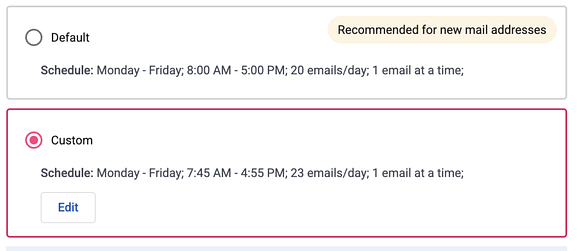
I avoid weekends and public holidays entirely.
Track open and response rates, then adjust. I found that sending up to 25 emails per day maintains strong deliverability before scaling gradually. Early on, I was too impatient: I sent 60 to 80 emails daily without sufficient targeting, personalisation, or account warm-up.
That approach yielded dismal response rates and feedback that my emails landed in spam.
How to Follow Up on Cold Email Outreach
Most outreach platforms like Mailshake allow automated follow ups that run until the recipient replies or opts out. I space follow-ups at least five days apart to avoid seeming pushy, especially since I may re-engage the same contact later.
I keep follow-up messages light-hearted to humanise the outreach.
Follow-Up 1 (5 days later):
I reached out a few days ago.
I get it. You’re swamped. Running a small business in Singapore is tough.
I just wanted to ensure you didn’t miss what we’re doing. This isn’t theoretical: we’ve executed this successfully and have a real case study to prove it.
Happy to share the case study if you’re interested.
Hope to hear back.
Final Follow-Up (5 days later):
[[Final effort to connect|One more try at reaching out|Ultimate bid to make contact|Last chance to engage]].
Third time’s the charm (or the restraining order). I won’t follow up again after this.
If this isn’t the right fit right now, perhaps you know another law firm or lawyer who could benefit.
I’d be grateful for the referral. Our agency pays out 100% of the first payment as a thank-you for referrals.
Either way, I totally understand. Keep crushing it.
Conclusion
The era of blasting 500 generic emails and hoping for the best is over. Your prospects are busy, and their inboxes are crowded. You need a thoughtful, AI-augmented process.
Let AI serve as your researcher, analyst, and personalisation assistant. Use it to build agentic workflows executable from simple code editors. Treat AI as a collaborative feedback loop whenever you encounter workflow challenges.
I landed my first legal marketing case study through this approach, without any pre-existing connections in Singapore’s legal industry, which is often perceived as elite and prestigious.
You don’t need connections. You don’t need an ad budget.
Scrape any online directory, personalise outreach based on each contact’s profile, and scale your campaign thoughtfully. The potential for B2B cold email lead generation is vast.
Now go send some emails.
